

Alternatives to JavaScript Tools
Stop sending sensitive code to servers and start formatting, validating, and securing data instantly with JSTools.Space's private, local developer.
20 alternatives found


Todowing
Chrome extension that nests Todoist sub-tasks inline in Today, Upcoming, Filters and Labels, where Todoist shows them flat.

Uniclip
Clip pages, take full-page screenshots and batch-capture list data to Notion, Feishu, Obsidian, Markdown, CSV or JSON.

TroveKey
Search tabs, Chrome bookmarks and history, run browser commands, and save webpages and social posts locally—no account.
Foreman
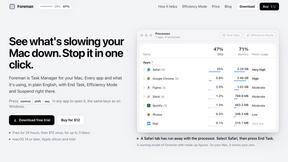
See every app and what it's using in plain English, and end or slow down the one that's hogging your Mac.

Bloom
An adaptive AI tutor that turns topics or your materials into courses, lessons, and answers tailored to how you learn.

Typebar
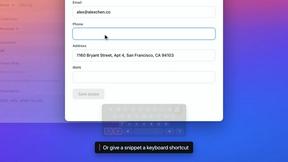
Every key you press lights up on an on-screen keyboard, and each shortcut is named. For screen recordings, demos and learning shortcuts.

LightScreen
Free fullscreen light screen tool online. Turn any display into a flashlight, ambient light, or solid-color screen. No download or sign-up.


LevCharity
Fundraising platform for nonprofits combining donations, campaigns, donor CRM, events, communications, and reporting.

CADCraft
Free, open-source 2D CAD in Rust for precise drafting, layers, dimensions, hatches, and DWG/DXF/PDF/SVG/PNG workflows.

Kovnerov
Personal site of Vlad Kovnerov: analytics dashboards, web development, Telegram bots and browser tools for sellers and subscription tracking.

Everywhere
Fast file search for the Mac. Results as you type, files inside Mail and Photos, works with Wi-Fi off. $19 once.

Basalt
Eighteen PDF tools in one native Mac window: merge, split, compress, OCR, Bates numbering, forms, signing and redaction. Offline. $29 once.

Voice Keyboard Pro
Hold a key, say what you mean, let go. Clean, punctuated text lands at the cursor in any app on your Mac or iPhone.

Mainspring
Mainspring turns the settings macOS hides into 90+ one-click, fully reversible power-ups for Finder, Dock, screenshots and more. $29 once.

Crumb
A Mac menu bar app for a full disk. See what is using your space, read whether it comes back on its own, and remove only what you tick.

Inkling
Catch a thought without leaving what you are doing. Notes, checklists and a little companion in your Mac's notch. $12 once.

ogimagegenerator.dev
Paste a URL and AI designs on-brand Open Graph images from your page's colours, fonts and logo. Free, no sign-up.
About JavaScript Tools Alternatives
Every developer eventually hits a wall with their tooling. You might be using a heavy, subscription-based service for formatting code or inspecting JSON, only to find it slows you down when you need a quick validation or a secure token generated on the spot. JavaScript Tools, specifically the JSTools.Space platform, sits squarely in the Dev Tools and Productivity & Management categories, offering a free, privacy-first alternative to bloated software. The frustration often comes from tools that require account creation, upload sensitive data to a server, or lock essential features behind a paywall, which is exactly why users start searching for something more streamlined and secure. When evaluating a replacement for your current JavaScript utilities, the priority should be speed and data sovereignty. Look for a tool that processes everything directly in your browser, eliminating the risk of uploading credentials or API keys to an external server. You also want a solution that requires zero setup or accounts, allowing you to jump straight from a code snippet to a formatted output or a generated UUID without friction. The ideal alternative will cover the full spectrum of daily tasks—from JSON inspection and JWT decoding to password generation and text comparison—while remaining completely free and accessible without sacrificing your privacy or workflow efficiency.
FAQs about JavaScript Tools Alternatives
What is JavaScript Tools?
JavaScript Tools, specifically JSTools.Space, is a free, privacy-first collection of developer utilities designed for common coding tasks. It allows users to format and validate code formats like JSON, HTML, CSS, XML, and Markdown, as well as encode Base64 and URLs. The platform also specializes in generating secure authentication values such as passwords, API keys, UUIDs, salts, and TOTP secrets, all without requiring an account.
Who is JavaScript Tools for?
JavaScript Tools is built for developers, security engineers, and IT professionals who need quick, reliable utilities for inspecting data and generating secure tokens. It is ideal for anyone who works with JSON payloads, JWTs, or structured data and prefers a tool that does not require uploading sensitive information to a server. The platform is also useful for front-end developers prototyping HTML, CSS, and JavaScript directly in the browser.
Is JavaScript Tools free?
Yes, JSTools.Space is completely free to use. There are no subscription fees, hidden costs, or premium tiers that lock essential formatting or generation features behind a paywall. Users can access all utilities, including the Dummy Data Library and developer documentation, without creating an account or providing any personal information.
Is JavaScript Tools secure?
Security is a core feature of JavaScript Tools, as most processing happens directly inside the user's browser. This means your code, credentials, tokens, and test data are never uploaded to an application server, significantly reducing the risk of data interception or storage. The platform also includes a dedicated developer security blog and tools for generating secure authentication values like nonces and hashes, reinforcing its commitment to privacy-first development.