ProcessSpy
ProcessSpy is the advanced Mac process monitor that gives you deep system visibility with powerful filtering and real-time insights.
Visit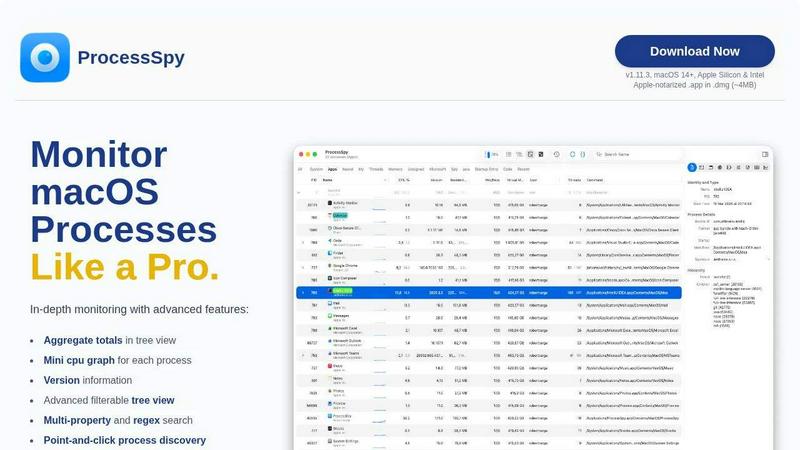
About ProcessSpy
ProcessSpy is the definitive process explorer and advanced system monitor built exclusively for macOS. It solves a critical problem for developers, IT professionals, and power users: the native Activity Monitor lacks the depth and detail needed for serious troubleshooting and system analysis. When you're trying to debug a misbehaving application, identify resource hogs, or understand complex process hierarchies, seeing just a process name like "java" or "node" is not enough. ProcessSpy reveals what Activity Monitor hides, providing a comprehensive, real-time view into every aspect of your system's activity. Its core value proposition is delivering Windows Sysinternals Process Explorer-level power and transparency within a fast, native, and beautifully integrated macOS application. From visualizing complete process trees and inspecting open files to viewing environment variables and instantly terminating stubborn processes, ProcessSpy empowers you to monitor your Mac like a true professional. It's designed for anyone who needs to go beyond surface-level metrics to gain genuine insight and control over their system.
Features of ProcessSpy
Advanced Hierarchical Process Tree
ProcessSpy doesn't just list processes; it visualizes them in a detailed tree view that clearly shows parent-child relationships. This is crucial for understanding how applications spawn helper processes or daemons. Even more powerful, it displays aggregate totals for CPU, memory, and thread usage directly within the tree hierarchy. This allows you to instantly see the total resource consumption of an entire application branch, not just individual components, making it easy to pinpoint which app family is responsible for system load.
Multi-Property and Regex Search
Finding the exact process you need is effortless with ProcessSpy's powerful quick-search. It supports regular expressions for pattern matching and can search across multiple properties simultaneously. For instance, you can search for processes with "python" in the name AND a specific virtual environment path in the command line. This multi-dimensional filtering cuts through the noise of hundreds of processes, allowing for surgical precision in process discovery and isolation, far beyond simple name matching.
JavaScript-Powered Custom Filters
When built-in search isn't enough, ProcessSpy offers unparalleled flexibility with JavaScript-based filters. You can write custom logic to create complex, multi-condition filters that can evaluate any process property. Want to see all processes launched in the last 5 minutes using more than 10% CPU? Or filter for unsigned processes from a specific user? JavaScript filters turn ProcessSpy into a programmable investigation tool, adapting to your specific and evolving diagnostic scenarios.
Comprehensive Process Context & History
ProcessSpy provides deep contextual information for each process, including full command-line paths, version details, and signature info. The paid features unlock a professional suite: view environment variables, entitlements, Info.plist contents, and bundle IDs with one click. It can also record historical metrics (CPU, Memory, Threads) and, uniquely, remember finished processes with their details for later forensic review. This creates a complete audit trail of system activity.
Use Cases of ProcessSpy
Debugging and Isolating Application Issues
When an application is freezing, crashing, or consuming excessive resources, Activity Monitor offers little clue beyond high CPU usage. ProcessSpy allows developers and support staff to drill down. You can identify the specific sub-process causing the problem, examine its open files and loaded libraries (dylibs), check its environment variables for misconfigurations, and view its full launch path. This turns a vague "App X is slow" into a specific, actionable diagnosis like "Helper process Y from App X is stuck in a loop."
System Cleanup and Stubborn Process Management
We've all encountered processes that refuse to quit, even via Force Quit. ProcessSpy gives you the upper hand. You can locate the exact process, see what files it has locked, and terminate it instantly and reliably. Furthermore, you can identify hidden launch agents or daemons that start unwanted processes and use the detailed context to safely remove their startup entries, ensuring a cleaner, faster-booting system.
Security Analysis and Monitoring
For security-conscious users and administrators, ProcessSpy is an invaluable tool. You can inspect process signatures to verify legitimacy, check entitlements to see what system access an app has, and flag newly discovered processes as they appear. The ability to review a history of all processes, including those that have finished, allows for post-incident analysis to detect suspicious short-lived executions that would otherwise vanish without a trace.
Performance Profiling and Optimization
Understanding true system performance requires looking at aggregate resource usage. A developer optimizing a multi-process application can use ProcessSpy's tree view with aggregate totals to see the combined CPU and memory footprint of their entire app suite. Recording historical metrics helps correlate performance spikes with specific user actions or code deployments, providing clear data for optimization efforts.
Frequently Asked Questions
Is ProcessSpy safe to install on my Mac?
Yes, ProcessSpy is completely safe. It is an Apple-notarized application, meaning Apple has scanned it for known malicious content and approved it. It is distributed as a signed .app file inside a .dmg disk image, which is the standard and secure method for macOS software distribution. It runs natively on both Intel and Apple Silicon Macs.
What versions of macOS does ProcessSpy support?
ProcessSpy is designed for modern macOS systems. It officially supports macOS 14 (Sonoma) and newer, including the latest versions. It is built using native macOS APIs to ensure performance and compatibility, which generally means it is optimized for recent OS releases rather than older, legacy systems.
What is the difference between the free and paid features?
The free version of ProcessSpy is incredibly powerful, offering the advanced tree view, multi-property search, JavaScript filters, basic process info, and the ability to kill processes. The paid license unlocks professional-grade features for deeper analysis: viewing environment variables and process entitlements, accessing the Info.plist, recording process history, remembering finished processes, and exporting data to CSV. The license is a one-time purchase.
What is the licensing model for ProcessSpy?
ProcessSpy uses a simple, user-centric license model. A single license purchase (priced at $24.99) is valid for one user across an unlimited number of their personal devices. This license includes lifetime updates, meaning you receive all future feature enhancements and compatibility updates for the product at no additional cost.
Similar to ProcessSpy

SightRadar
Face recognition API, a drop-in replacement for AWS Rekognition. Index, search, compare and detect faces, billed per photo with no subscription.

Egmatic
No-code 2D game editor: visual node logic, drag-and-drop scenes, live preview. Exports to Windows, macOS, Linux, Android, iOS, Web.


laya.tools
A free directory of 950+ projects built on Laya, the open-source decision model. Updated daily.

Sprite Sheet Maker
A free browser-based toolkit for creating, cutting, converting, and previewing sprite sheet animations.

Forms Plugin
The #1 Native Form Builder Plugin for Framer - No Code, No Embeds, No External Platforms.