
Subclip
Subclip streamlines video editing by using AI to automate captions, dubbing, and noise removal, saving you time and enhancing your content.
Visit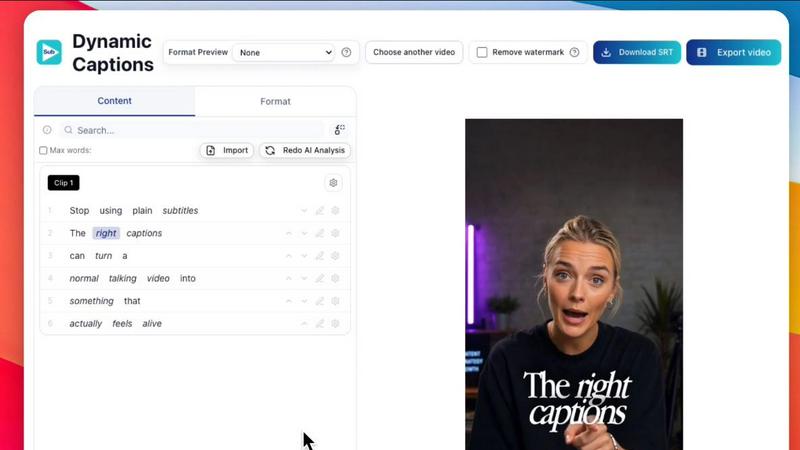
About Subclip
Subclip is an innovative AI-powered video editing tool designed to simplify the video production process for creators, marketers, and educators. By transforming video editing into a more intuitive experience akin to editing a document, Subclip allows users to seamlessly drag and drop transcripts for easy editing. With features like voice cloning, users can re-record parts of their videos with their own voice, ensuring a consistent and personalized touch. The platform also offers one-click silence and filler word removal, making it easier than ever to create polished content. With the ability to auto-generate accurate subtitles and dub videos into multiple languages while preserving background music, Subclip is tailored for a diverse range of users, including YouTubers, podcasters, and content teams. By streamlining the entire video production workflow, Subclip removes the complexity associated with traditional editing tools, ultimately saving users hours of work. Its freemium pricing model, which includes a free tier and affordable paid plans, makes it accessible for everyone looking to enhance their video content.
Features of Subclip
AI Clipping
Subclip's AI Clipping feature intelligently identifies high-energy segments, punchlines, and emotional shifts within your footage, allowing you to quickly extract the most engaging clips without the usual manual effort. It automatically highlights viral moments, helping you create content that resonates with your audience.
One-Click Unlimited Captions
With Subclip, generating subtitles is a breeze. The One-Click Unlimited Captions feature allows users to create accurate subtitles in over 48 languages with just a single click. This automatic transcription simplifies the captioning process, enabling you to focus on content quality rather than formatting.
AI Dubbing with Voice Clone
The AI Dubbing feature allows you to translate your videos into 21+ languages using voice cloning technology. This means you can maintain your original tone and emotion while reaching a global audience. The seamless dubbing process ensures that your content remains engaging in any language.
Enhanced Audio Processing
Subclip offers robust audio enhancement capabilities, including background noise removal and vocal clarity improvements. This feature ensures that your recordings sound studio-ready, allowing you to produce high-quality audio without the need for complex editing tools.
Use Cases of Subclip
Subclip for YouTubers
YouTubers can leverage Subclip to easily edit long-form videos, quickly extract clips for social media, and add engaging captions. By streamlining the editing process, creators can focus more on content creation and audience engagement, ultimately increasing viewership.
Subclip for Educators
Educators can utilize Subclip to dub their recorded lectures or courses into multiple languages, making learning more accessible for international students. The AI-powered features save time on editing, allowing educators to dedicate more time to teaching.
Subclip for Podcasters
Podcasters benefit from Subclip’s ability to enhance audio quality by removing background noise and silences. The platform’s transcription and captioning capabilities also enable podcasters to create engaging video snippets for promotion, increasing their reach and engagement.
Subclip for Marketing Teams
Marketing teams can use Subclip to produce high-quality promotional videos quickly. With features like AI Clipping and one-click captioning, teams can efficiently create marketing content that resonates with their audience, maximizing their impact across various platforms.
Frequently Asked Questions
How does Subclip improve the video editing process?
Subclip revolutionizes video editing by simplifying it to a document-like experience, allowing users to edit transcripts directly, automate captioning, and utilize AI for various tasks, significantly reducing editing time.
Can I collaborate with my team on Subclip?
Yes, Subclip includes collaborative features that allow team members to share projects, provide feedback, and work together seamlessly within a single platform, enhancing productivity and teamwork.
What languages does Subclip support for dubbing and subtitles?
Subclip supports dubbing and subtitle generation in over 48 languages, making it an excellent choice for creators looking to reach a diverse, global audience.
Is there a free version of Subclip available?
Yes, Subclip offers a freemium model that includes a free tier, allowing users to explore its core features without any financial commitment. Paid plans are also available for those who need advanced capabilities.
Similar to Subclip

Oravaa
Oravaa's Voice AI solves lead abandonment and 24/7 support by instantly calling, qualifying, and scheduling across 30+ languages.

Hush Touch | Voice-to-Text for MacOS
Hush Touch is an offline voice-to-text app for Mac that learns your vocabulary, ensuring accurate, real-time dictation.

Glossa
Glossa provides real-time AI translation of sermons in over 100 languages, enabling churches to connect globally.

Bantr: Offline & Unlimited TTS for Mac
Bantr creates unlimited, private text-to-speech voiceovers fully offline on your Mac.

KaiCalls
KaiCalls is your 24/7 AI voice agent that instantly answers calls, qualifies leads, and books appointments for your.

Vowen
Vowen turns your voice into text and actions, streamlining productivity with seamless automation and privacy.
Bargou One
Stop language and creation barriers with Bargou One's all-in-one AI toolkit for writing, translating, and transcribing.